What Is Digital Commerce?

What is digital commerce

When you think of markets you probably think of busy stalls and costumers interacting with the venders. The word commerce means the buying and selling of goods and services, basically, a market is system or a platforms for people to commerce. These platforms doesn’t have to be physical, nowadays it’s all digital and that’s where digital commerce comes in.

What are digital commerce solutions? Benefits, Types, Practices

Why use digital commerce?

First, the efficiency. Picture this: instead of having to walk all the way to the grocery store to buy milk, you could have it delivered right to your door with a press of a button. New technology bring new efficiency. Digital commerce also gives a variety of items that you probably could not get in your area. For example, you probably wouldn’t find camel milk in your local grocery store if you live in Taiwan, but with digital commerce you can get it shipped to your house.

your privacy in digital commerce

Before you buy anything, you must first give information to the website. It could include, your name, birth, location, credit card, etc. Once they have your information, you are free to buy stuff. Now, without realizing, you have just put your private information in the hands of the website. You never know what they’re going to do with it.

Dangers of digital commerce

Now that you have given your information to the website, your information is now vulnerable. There is no guarantee that the information is safe, it could be sold or even stolen by hackers. Whenever a website is hacked, the hacker would try to take as much information as possible and sell them on the dark web. The person with that information could use it to fake you.

Scams are common among many digital commerce.  For example you see a PS5 online for $10, and you obviously know that it is not actually that cheap. It might be just a trick to get your money and information.

Conclusion

Even though there might be some dangers of digital commerce, it still has a lot of efficiency and not using it would be a inconvenient. Next time you’re online, be mindful of where your information goes. Know how to protect your personal information. Be more cautious whenever you buy an online product that seems suspicious.

Wait, don’t go yet. Check out https://haveibeenpwned.com/ and https://haveibeenpwned.com/Passwords to see if your account and password has been hacked or stolen.

Cyberbullying Reflection – Eric Tsai

First, lets introduce cyberbullying? It is like bullying that takes place over digital devices such as mobile phones and laptops. It involves intentional use of mainly social media platforms or text messages to harm another person. Doing things such as sharing false information or embarrassing photos of someone, usually done in public.

Is Cyberbullying digital trauma?

No cyberbullying is not digital trauma but it could directly can cause digital trauma, think of it as a cause and effect. Lets break it down to what is digital trauma, it is a phycological or emotional distress caused by the digital environment. Cyberbullying and online harassment are the main cause of digital trauma because any kind of harm done in a digit environment could result in the effect of digit trauma

Ask yourself questions

Mainly cyberbullies use something you shared against you. These messages are permanent and could reach a lot of people in short time. So you have to be careful next time you communicate online. These are some questions on how you should communicate online next time.

• Is this how I want people to see me?

Generally, you would not want people to have a bad perspective of you so think twice before you post anything that might mislead other people’s perspective of you.
• Could somebody use this to hurt me?

Anything that you post online could potentially be weaponized by your “friends” to use against you. You gave them access to it and now they have the power to use it (you literally gave them that power). They could use this information to do all kinds of things with it to harm you, for example they could make fun of you in public using that information. Sometimes, they don’t actually know that they are harming, and just thought it was funny. You know what’s actually funny? Them getting in trouble for it.
• Would I be upset if they shared it with others?

Never share anything private of secretive with anyone else through social media. Why? Anything that was ever been on the internet will be there forever and nothing could erase it. So, if you share your secrets with your friend or anyone online, you simply just give them something to harm you. In other words its like putting a fox in charge of a henhouse, you trust someone with important things who would likely mess things up (in a bad way).
• What is the worst thing that could happen if I shared this?

As I already said, anything on the internet is permanent, so what is there is there for ever. Secondly, in a worst case scenario, that one post that insulted you have gone “viral” and now you’re being publicly humiliated Infront of the whole world to see as entertainment. What I’m saying it that something in the internet could potentially reach a lot of views in a very fast time.

What could be done if you’re a upstander

As a person seeing it happen, you have to try to take action and stop it. Stop being a bystander and start being an upstander, stand up for person being cyberbullied. How, you might say? There are three things that could be done, shown below.
  • Acknowledge that it was not RIGHT.
  • Comfort the targeted person in private.
  • Report it to authority.

For me, I would acknowledge it first, because you have to know what is happening and tell the difference between joking and harming. It is most important because some people might not even know that they are harassing someone of being harassed online. So, you have to know it first before you do something about it, otherwise it might lead do misconceptions and a whole lot other stuff that you probably don’t want to deal with. But most importantly, if you see any suspicious behavior online, try to stand up for it because it was the right thing to do!

videos about cyberbullying for more information.

https://www.youtube.com/watch?v=0oGFh0mwrjM&authuser=0: Cyberbullying Reflection – Eric Tsai https://www.youtube.com/watch?v=fLP3TIl_Hek&authuser=0: Cyberbullying Reflection – Eric Tsai

Meanings of technology use for educational purposes.

Technology in education means to use in a way that does not abuse the purposes of education. For example, nowadays students and teachers could simply rely on artificial intelligence for their own use. The way you use it determines your consequences and success.

Technology use problem solving

Technology have always been around human civilization, always helping humans in different ways. They are created to meet our needs and solve real world problems. These are some examples…

  • How artificial intelligence, or AI could answer questions and have conversations with you, using pre-trained knowledge from public information.
  • How agricultural drones enhance efficiency on watering plants, spraying pesticide and fertilizers, and monitor plants, instead of human labor.

Importance of keyboarding

Like many example on the top, the keyboard is also a technology invented to help solve problems. Mainly keyboarding brings speed in writing, for example, the average words you could write on pencil per minute is about 13 words, while on keyboard the average would be 40 words per minute. By writing more words means more efficiency in doing work, thus getting more done. On keyboard, it was easier to fix mistakes, like you could write and rewrite in a short amount of time. As in academics and career, you could work done more efficiently and with fluency, leading to success in the future.

Use of technology in critical thinking

Critical thinking is the state where you make judgement on what you read, hear, or write. There are some technology that could support or even enhance this state of thinking, for instance the use of mind tools, which are cognitive tools that presents information in new ways to facilitate critical thinking for students. Applications such as spread sheets, databases , and concept maps could be use as mind tools.

Meaning of Technology in education at school.

The use of technology in at school is to facilitate educational ideas and critical thinking. As shown above, technology is useful for us, and could be useful in schools as well. As I said, technology could bring efficiency for students, like how I’m writing a blog instead of a hand written poster, and it could provide tools that enhances critical thinking. Uses at school, technology would be use in a way that does not obstruct the purposes of education. In a way that provides a helpful tool instead of exploitation.

General rules of the IBST computer lab.

  •   Save early, save often, about every ten minutes.
  •   No food or drink around digital devices.
  •   Respect the work of others and yourself.
  •   Keep your body to yourself—don’t touch neighbor’s digital device.
  •   No excuses; don’t blame people or computer.
  •   Help neighbor with words, not by doing.
  •   When collaborating, build on others’ ideas as you clearly express your own.
  •   As a general rule: Select first, then do. You can’t do the latter without the former.

How To Dissect a Desktop Computer

Like a living organism, a desktop computer have many organs (components). Today me and my partner Ryder are going to show you how to take out all the organs from a school desktop. Before we start my mind is full of excitement and curiosity of what might be inside the computer case.

Step one: open up the body (the case)

In this step we unscrew the screws of the case before pulling out the case. At first pulling it out involves a little force but later we mastered it.

Step two: Unplugging the blood vessels (the wires)

Before we start unplugging any wires, we had to first take pictures so we know how to plug them back. One surprising thing we learned is that the wires and plugs are very idiot proof. The shape of wires had to match the shape of plugs.

Step three: taking out the main organs (motherboard)

First we unscrew the screws, then we lift up the motherboard. Before we lift it up we had to make sure all the screws were un screw other wise the motherboard will break.

Step four: remove the short-term memory (RAM)

The RAM is attached to the motherboard, in order to remove it we must push down on lever that releases it. After the procedure, I observed it carefully before putting it back.

step five: removing the long-term memory (hard drive)

The hard drive is also called the long-term memory. It looks like a CD player because there are multiple disks spinning at high speed inside. It was stored in a basket like case and could be removed by hand. We had to be careful because our computer is old and the plastic could be weak.

Step six: take out the brain (the CPU)

This step is the most difficult part of the whole procedure, if we made a mistake, we had to pay for the CPU. A computer without a CPU is like an animal without a brain, its job in the computer is very important , without the computer could not work. First we unscrew the fan on top of the CPU, then we slowly lift up the top of the CPU. Under it, were at least a hundred tiny pins. The pins are so delicately place like neurons in a brain.

Step seven: Remove the fat and digestive system (Power supply unit)

The power supply unit is the like a digestive system, turning wall outlet electricity into usable energy for computer to use. They could also store energy for years, even if the computer is no longer used, like fat. You won’t get electrocuted unless your stick a finger into it.

Anatomy of a desktop computer

Like the human body, a computer have many parts like organs in a body. Without these main organs the computer cannot work properly.

This is a motherboard, its job is to hold up and connect to other organs of the computer. The motherboard connects to every part of the computer, it also connects to the screen, mouse, and keyboard.

This is the CPU, it was the brain of the computer, it was located on the motherboard. It’s job is to carries out commands when you move your mouse or press a key. This is my favorite part of the computer because without it the computer can’t work. Without it, it was like a hamburger without the meat or a cell without a nucleus.

This is the power unit supply, it’s job was to convert power from the outlet into power that the computer needs and sends it through cables to other parts of the computer.

This is the video card or graphic card or GPU makes your improves your graphics if you want to play graphics intensive video games.

This is the RAM, also called random access memory, It was the computer’s short term memory. When ever the computer performs calculations, it stores the temporary information in the RAM. Information stored in the RAM disappears immediately when the computer turn off.

If your worried that your document is going to disappear then you might need a hard drive, also known as the computer’s long term memory. When ever you save a file it will be copied into the hard drive. Unlike the RAM, information stored in the hard drive will be saved even if you turn the computer off.

Python

An app that lets you code . You can do any thing in the app by coding.

How to code

First download Python before coding, Then you search for the app IDEL Python. Then you will have a file called IDEL shell and you click file and then new file. You will get a new file, this is the file you code on and the IDEL shell is where the code will come out.

First I learn how to print . Print is to print the worlds you write in the quotation marks appear in the IDEL shell.

Then I learn input which let the code put what the user type in the variable. Then you can use the variable later in the code.

Keys

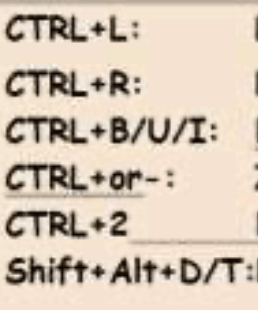
ctrl + c Copies the words that was high lighted.

ctrl + x Cuts your paragraph

ctrl + shift + escape Shows task manage

shift alt d Type down the date

shift alt t Type down the time

alt + F4 Delete tab

alt + tab Delete

wk Search for apps

wk + m minimize

wk + spacebar Change languages

shake win Minimize and maximize

click scroll on mouse Let you scroll the page by moving it up and down

Words You must know.

  • Back-up
  • Landscape
  • Orientation
  • Portrait
  • Save-as vs save

Back up. Back up is a second file that is a copy of a file that already existed to prevent it from loosing it

orientation . Orientation is a button that let you choose landscape and portrait witch turn your paper in your paper in your computer around.

Landscape . Landscape is your page in you computer sideways like this.

Portrait . Portrait is your page in your document or slide sideways

Save As . Save As is saving your document to a file and also changing the name of you document.

Save . Save and save as is different. save is saving the changes you made after you re-open your document but it doesn’t save it in a file.

Energy skate park From Colorado Phet

All energy were only 2 energy one is kinetic the other is potential. In this simulation called Colorado Phet can show you how the 2 energies swiches. Kinetic is the energy of motion and poteintial is the energy that is stored. in the simulation you put the skate boared person on the ramp. the game is mostly like real life but you can change the gravity and friction. in the simulation the kinetic energy will turn into thermo energy if you add friction.

This photo is showing when the potential is the highest kenitic is the lowest.

This image has an empty alt attribute; its file name is Capture-1024x632.png

This picture is when all the kenitic energy turning in to thermo energy.

This picture is showing the kinetic energy going the highest.

This simulation is good for learning and it helps you learn better by making you unter stand how kinetic and potential energy works. In this simulation I have done so many experiments. i changed the track and made it low gravity and the skater ended up going to the moon. I learned that kinetic and potential energy kept swiching between each other.

For my conclution this simulation is very good you make your own track and test the skaters. it is well made and it makes learning more fun. it teaches you about kinetic and potential energy and also thermo energy.

Ms word and google docs ,and dictionary.

Word and docs witch is better? I think they were both the same but in docs ,if you click on the word it will say the meaning , prefix , verb , and the noun of the word, But in Word it will give you synonyms. I think docs is better because it gives you more meaning to help you understand.

O Links

think they were both useful because they help you turn complex words to simple words.

                                          What do you think?

Google文件- 维基百科,自由的百科全书